
- What do the Chinese, Swedish and Zulu languages have in common?
When we talk about accents in a written form we are talking about emphasis or stress marks above the letters described as: Grave, Acute, Circumflex, Tilde, Umlaut and Dot; NOT a national accent like South Africa, Australian, Indian etc. OR a local accent like Eastern Cape, Western Cape etc.
English and many other languages distinguish the different parts or syllables of a word by stressing one of them, but the ancient Greeks pronounced them with a distinct difference in musical pitch. Syllables marked with a grave accent (for example à, from Latin gravis ‘heavy, serious’) were spoken at a comparatively low pitch, those with an acute (á, from Latin acutus ‘sharp, high’) at a higher pitch, and those with a circumflex (?, from the Latin circumflexus, ‘bent around’ began at the higher pitch and descended during the pronunciation of the syllable.
The above goves some explanation of why the root of accent is Latin cantus ‘song’ which was a direct translation of the Greek word prosÿidia. Quite a few languages (technically known as ‘tonal’ languages) still have this musical way of speaking, among them Chinese, Swedish and Zulu: anyone familiar with the ‘sing-song’ speech of the Swedish chef in The Muppet Show will know what this sounds like.
How to type accents on Apple keyboard?
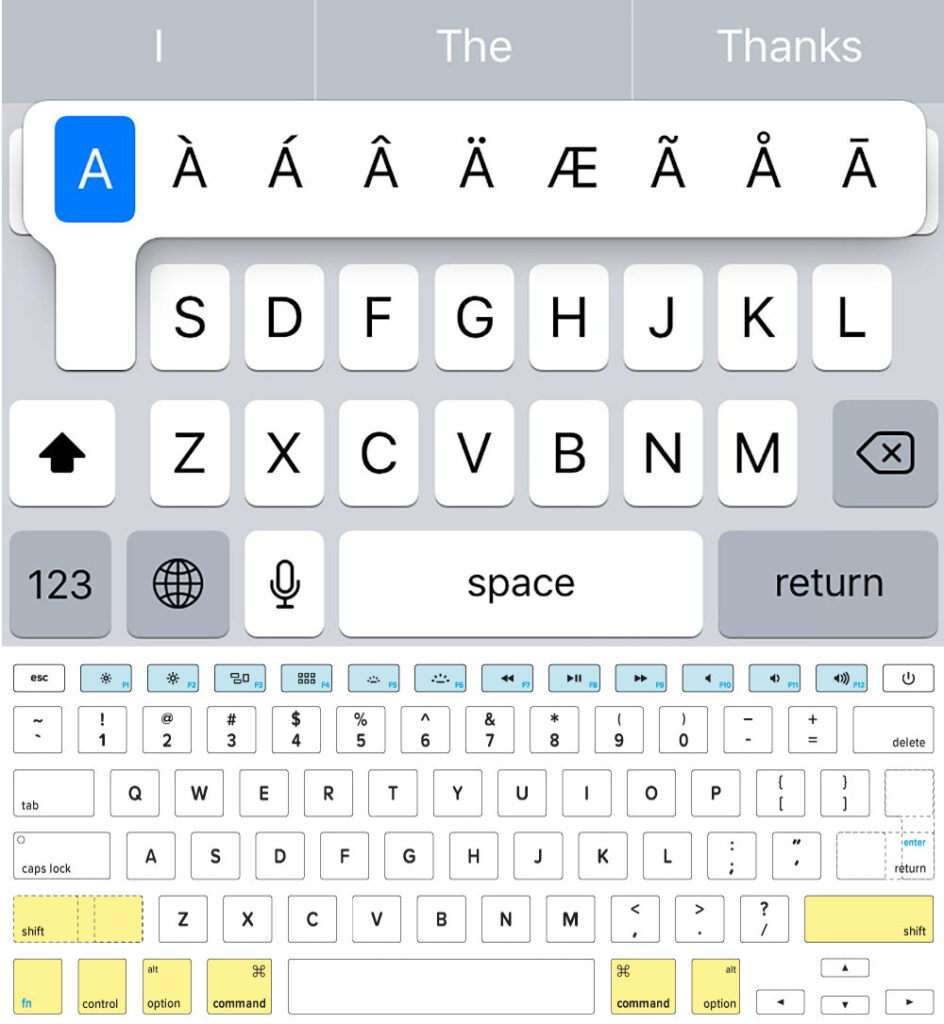
- In an app on your Mac, press and hold a letter key on the keyboard—for example, a—to display the accent menu. The menu isn’t shown if a key doesn’t have any possible accent marks.
- Select a character in the menu—for example, á.
- You can also press and hold the OPTION key (to be found between the ctrl and cmd keys) and the corresponsing letter. This method also produces symbols such as © (OPTION G) or ® (OPTION R).
How to type accents on a Windows Keyboard?
There are 5 methods to do so – below is the method closest to the IOS keyboard by typing accented characters using keyboard shortcuts: On Windows, there exist keyboard shortcuts for all five accents characters from foreign languages can have, and typing the shortcut for a specific accent in unison with the English alphabet counterpart of the accented character you want to type results in the desired accented character being typed.
Here’s how you can type accented characters using their keyboard shortcuts:
- Press and hold the Ctrl key on your keyboard.
- Press and hold the ` key if you desire a character with a grave accent, the ‘ key if you desire a character with an acute accent, the Shift and ^ keys if you desire a character with a circumflex accent, the Shift and ~ keys if you desire a character with a tilde accent or the Shift and: keys if you desire a character with an umlaut accent.
- Type in the English alphabet counterpart of the accented character you want to type. Be sure to press and hold the Shift key before typing in the character if you want the end result to be a capitalized accented character.
- A sample key sequence would be Ctrl + ` + e to type in è or Ctrl + Shift + ~ + Shift + N to type in Ñ.
How to type accents on a Linux Keyboard?
Similar to typing accents with a series of keystrokes, the Compose key allows you to quickly enter accent marks with just a few keystrokes. The catch is that you need Ubuntu along with the Gnome desktop in order to take advantage of the Compose feature.
Set a compose key by opening Settings navigate to the Keyboard section in the left column, then, under the Special Characters section, select Compose Key. Turn off the Default Layout, and select which key you would like to use.
After you have set a compose key, entering specific diacritics becomes as easy as entering the right series of keystrokes.
- Grave: Type Compose + Grave (`) + Letter.
- Acute: Type Compose + Apostrophe (‘) + Letter.
- Circumflex: Type Compose + Carat (^) + Letter.
- Tilde: Type Compose + Tilde (~) + Letter.
- Umlaut: Type Compose + Quote (“) + Letter.
- Dot: Type Compose + Period (.) + Letter.
This article is one in a series of articles on the Origins of English Words and Phrases. As a professional writer one has to have an extremely good command of the English Language in order to communicate decent marketing and SEO Strategies for clients.
If you want to engage Alan to write or consult for you then please CLICK HERE to LEARN MORE and ORDER your first DISCOUNTED Article.
Boilerplate and Editor’s Notes.
More Info on accent here:
Twitter: https://twitter.com/MyPE
Facebook: https://www.facebook.com/AlanStraton/
CLICK HERE to submit your press release to MyPR.co.za.
Press Release Views since 1 July 2022: 66


 Learners urged to work hard at school